This template demonstrates the capabilities of Quarto for academic writing. It shows how to create complex documents with figures, tables, citations, and specialized formatting. The template supports multiple output formats including HTML, Word, and PDF via Typst.
Keywords
Keyword One, Keyword Two, Keyword Three
1 Key findings
This template demonstrates effective academic document structure. Key findings should summarize main points in clear, concise language. Each bullet point should be substantive and typically 2-3 sentences long.
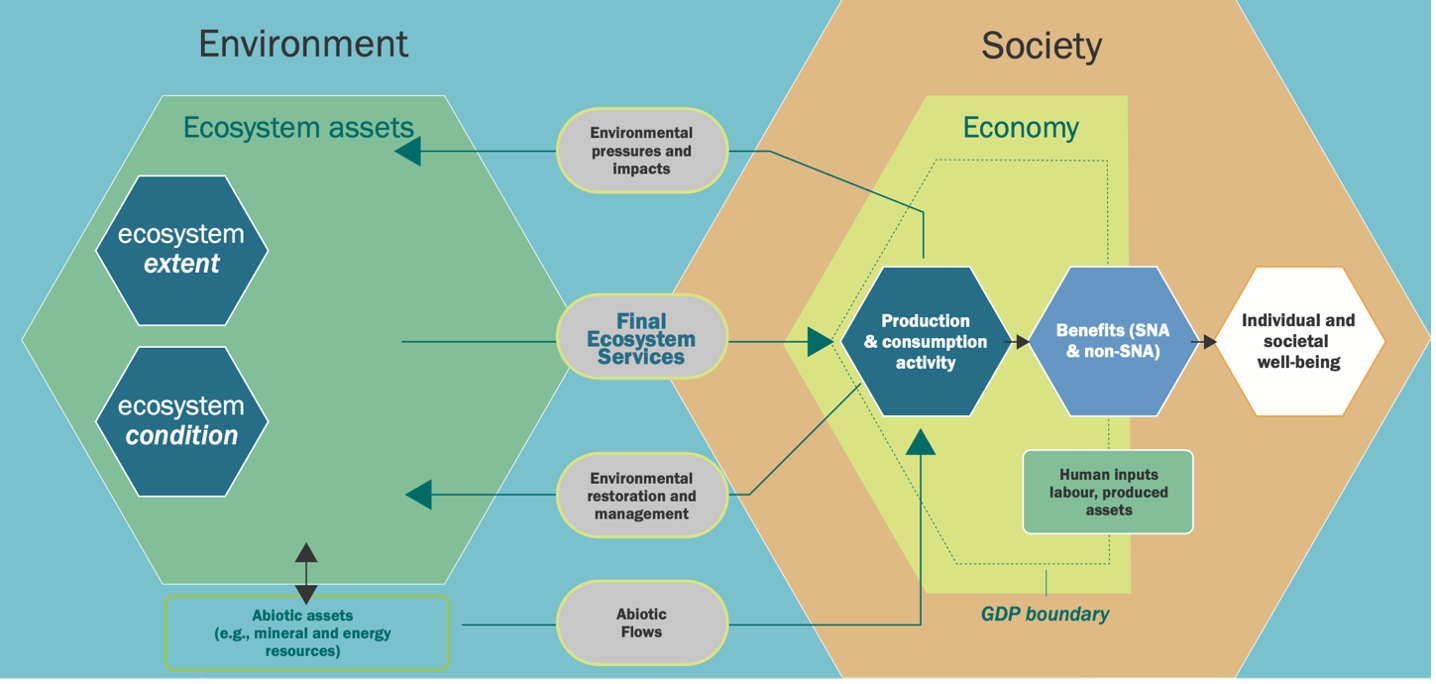
Complex features can be demonstrated throughout, such as cross-references (see Figure 1), citations (Capitals Coalition 2024), and footnotes1. These features work across all output formats including HTML, Word and PDF.
When outputting to HTML, interactive elements can be included:
In [6]:
if (knitr::is_html_output()) {# Example interactive plotlibrary(plotly)plot_ly(data =data.frame(x =1:10, y =1:10), x =~x, y =~y, type ='scatter', mode ='lines+markers')}
Loading required package: ggplot2
Attaching package: 'plotly'
The following object is masked from 'package:ggplot2':

    last_plot
The following object is masked from 'package:stats':

    filter
The following object is masked from 'package:graphics':

    layout
Figure 3: Interactive plot example (HTML only)
3.7 Appendix
Additional tables and supplementary information can be included here. The template supports multiple appendices and complex table layouts:
In [7]:
In [8]:
appendix_data <-data.frame(Category =c("Type 1", "Type 2", "Type 3"),Description =c("Detailed example text", "More example content", "Final example entry"),Value =c("High", "Medium", "Low"))kable(appendix_data, format ="simple",booktabs =TRUE,align ='l')
Table 3: Example Appendix Table
Category
Description
Value
Type 1
Detailed example text
High
Type 2
More example content
Medium
Type 3
Final example entry
Low
Appendix
Note that references need to be included in BibTex format in the relevant file (references.bib)